šø PolaroWeb
š Deskripsi
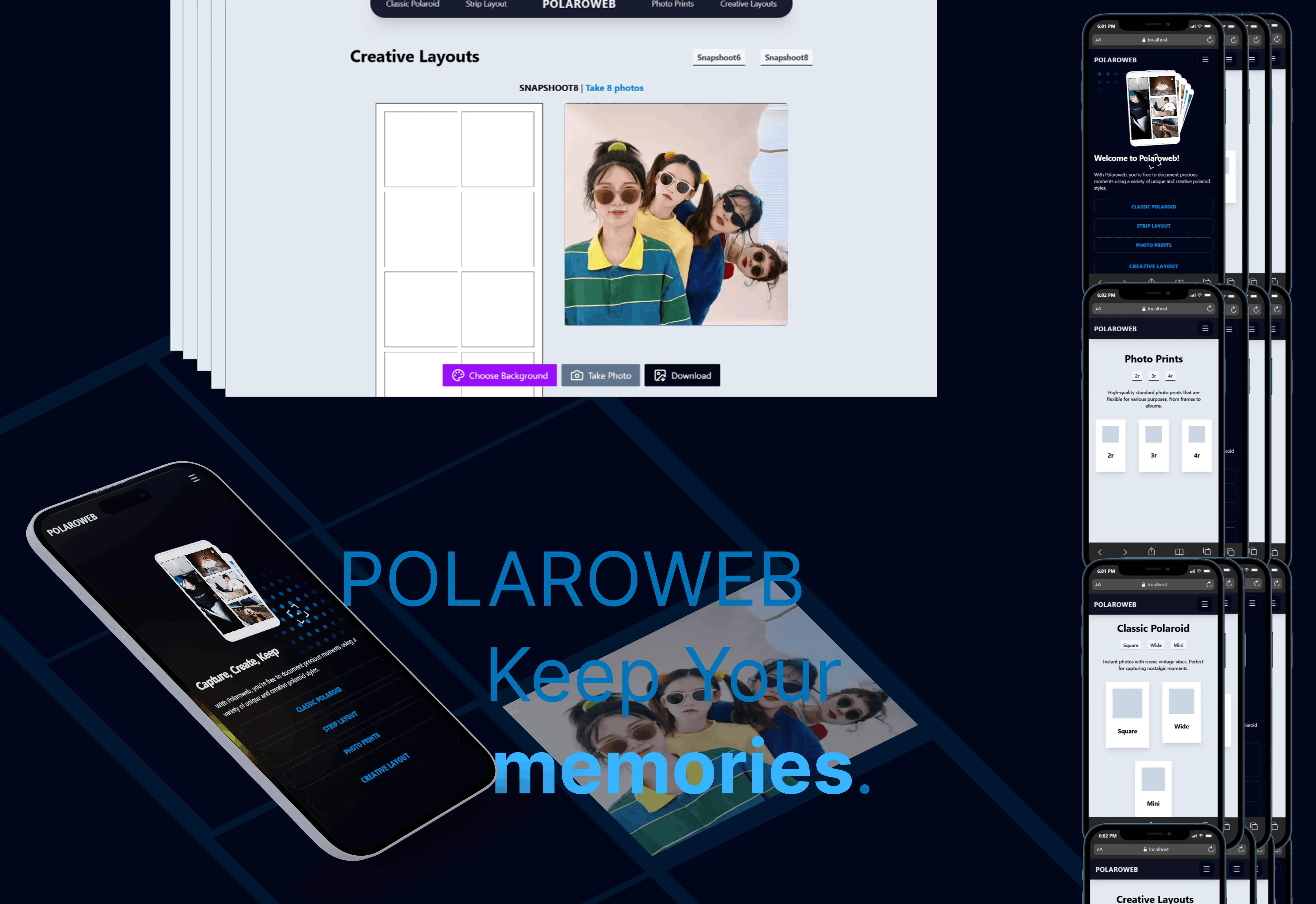
PolaroWeb adalah aplikasi photobooth berbasis web yang memungkinkan pengguna membuat foto polaroid digital dengan berbagai layout kreatif. Dibangun dengan teknologi modern seperti React 19, Vite, TypeScript, dan Tailwind CSS v4.
šÆ Tujuan Aplikasi
- Memberikan pengalaman photobooth digital yang mudah dan menarik
- Menyediakan berbagai pilihan layout polaroid (Classic, Strip, Photo Prints, Creative)
- Mendukung fitur PWA (Progressive Web App) agar dapat diakses offline dan diinstall di perangkat
⨠Fitur
š· Mode Photobooth
| Mode | Deskripsi | Layout Tersedia |
|---|---|---|
| Classic Polaroid | Foto instan dengan nuansa vintage yang ikonik | Square, Wide, Mini |
| Strip Layout | Cetakan foto dalam bentuk strip | 3 Strips, 4 Strips |
| Photo Prints | Cetakan foto standar berkualitas tinggi | 2R, 3R, 4R |
| Creative Layouts | Format inovatif untuk kreativitas | Snapshoot6, Snapshoot8 |
šØ Fitur Lainnya
- š Background Picker - Pilih background dari preset, warna solid, atau upload gambar sendiri
- š± PWA Support - Install sebagai aplikasi dan gunakan secara offline
- š„ļø Responsive Design - Tampilan optimal di desktop dan mobile
- ā” Animasi Interaktif - UI yang dinamis dengan GSAP dan Motion
š ļø Teknologi yang Digunakan
| Teknologi | Versi | Fungsi |
|---|---|---|
| React | 19.1.1 | Library UI utama |
| Vite | 7.1.2 | Build tool & dev server |
| TypeScript | 5.8.3 | Type safety |
| Tailwind CSS | 4.1.12 | Styling utility-first |
| React Router | 7.9.1 | Client-side routing |
| GSAP | 3.13.0 | Animasi kompleks |
| Motion | 12.23.16 | Animasi deklaratif |
| Lucide React | 0.544.0 | Icon library |
| Three.js | 0.180.0 | 3D graphics |
š Cara Menjalankan
Prasyarat
Pastikan sudah terinstall:
- Node.js (versi 18 atau lebih tinggi)
- pnpm (disarankan) atau npm
Langkah-langkah
1. Clone Repository
git clone https://github.com/username/polaroweb.git
cd polaroweb
2. Install Dependencies
# Menggunakan pnpm (disarankan)
pnpm install
# Atau menggunakan npm
npm install
3. Jalankan Development Server
# Menggunakan pnpm
pnpm dev
# Atau menggunakan npm
npm run dev
Aplikasi akan berjalan di http://localhost:5173
4. Build untuk Production
# Menggunakan pnpm
pnpm build
# Atau menggunakan npm
npm run build
5. Preview Production Build
# Menggunakan pnpm
pnpm preview
# Atau menggunakan npm
npm run preview
Catatan: Preview menggunakan HTTPS dengan sertifikat lokal dari folder
cert/
š Struktur Folder
polaroweb/
āāā š index.html # Entry point HTML dengan SEO & PWA config
āāā š package.json # Konfigurasi project & dependencies
āāā š vite.config.ts # Konfigurasi Vite dengan alias & HTTPS
āāā š tsconfig.json # Konfigurasi TypeScript
āāā š eslint.config.js # Konfigurasi ESLint
āāā š components.json # Konfigurasi shadcn/ui
āāā š firebase.json # Konfigurasi Firebase hosting
āāā š .firebaserc # Firebase project config
ā
āāā š src/ # Source code utama
ā āāā š main.tsx # Entry point React dengan Router
ā āāā š App.tsx # Root component dengan routes
ā āāā š App.css # Styling untuk App
ā āāā š index.css # Global CSS dengan Tailwind
ā āāā š vite-env.d.ts # TypeScript declarations untuk Vite
ā ā
ā āāā š components/ # Komponen React
ā ā āāā š layouts/ # Layout components
ā ā ā āāā š Header.tsx # Header dengan efek scroll
ā ā ā āāā š Nav.tsx # Navigasi utama
ā ā ā āāā š ListNav.tsx # Item navigasi
ā ā ā āāā š Footer.tsx # Footer component
ā ā ā āāā š HeroSection.tsx # Hero section halaman utama
ā ā ā āāā š Designed.tsx # Section pilihan layout
ā ā ā āāā š CardCustom.tsx # Card custom component
ā ā ā
ā ā āāā š pages/ # Halaman aplikasi
ā ā ā āāā š Beranda.tsx # Halaman beranda
ā ā ā āāā š CustomPage.tsx # Halaman kategori
ā ā ā āāā š ClassicPolaroidPage.tsx # Mode Classic Polaroid
ā ā ā āāā š StripLayoutPage.tsx # Mode Strip Layout
ā ā ā āāā š PhotoPrintsPage.tsx # Mode Photo Prints
ā ā ā āāā š CreativeLayoutsPage.tsx # Mode Creative Layouts
ā ā ā
ā ā āāā š ui/ # UI primitives (shadcn/ui)
ā ā ā āāā š button.tsx # Button component
ā ā ā
ā ā āāā š AnimatedContent.tsx # Komponen animasi GSAP
ā ā āāā š BackgroundPicker.tsx # Picker untuk background
ā ā āāā š DotGrid.tsx # Background interaktif dots
ā ā āāā š FadeContent.tsx # Animasi fade in
ā ā āāā š PwaInstallButton.tsx # Tombol install PWA
ā ā āāā š RotatingText.tsx # Teks berputar animasi
ā ā āāā š SEO.tsx # Komponen SEO dengan Helmet
ā ā āāā š Stack.tsx # Stack cards animasi
ā ā āāā š TargetCursor.tsx # Custom cursor effect
ā ā āāā š TextType.tsx # Efek typing text
ā ā āāā š TItleForPage.tsx # Title reusable component
ā ā
ā āāā š context/ # React Context
ā ā āāā š BackgroundContext.tsx # State global untuk background
ā ā
ā āāā š hooks/ # Custom React Hooks
ā ā āāā š useCamera.ts # Hook untuk akses kamera
ā ā āāā š usePwaPrompt.ts # Hook untuk PWA install prompt
ā ā
ā āāā š lib/ # Library & data
ā ā āāā š utils.ts # Utility functions (cn, getLayoutFromType)
ā ā āāā š data.d.tsx # Data kategori polaroid
ā ā āāā š data-background.tsx # Data preset background
ā ā āāā š seo.data.ts # Data SEO untuk setiap halaman
ā ā
ā āāā š utils/ # Utility functions untuk photobooth
ā ā āāā š ambil-foto.tsx # Fungsi capture foto
ā ā āāā š atur-layout.tsx # Fungsi mengatur layout
ā ā āāā š download-photo.tsx # Fungsi download hasil
ā ā āāā š mulai-kamera.tsx # Fungsi memulai kamera
ā ā āāā š photo-utils.tsx # Utility foto lainnya
ā ā āāā š types-props.tsx # TypeScript types
ā ā
ā āāā š assets/ # Static assets (images, fonts)
ā
āāā š public/ # Static public files
ā āāā š manifest.webmanifest # PWA manifest
ā āāā š sw.js # Service Worker
ā āāā š pwa-192x192.png # PWA icon 192x192
ā āāā š pwa-512x512.png # PWA icon 512x512
ā āāā š icon.jpeg # Favicon
ā āāā š image/ # Gambar untuk hero section
ā āāā š background/ # Preset background images
ā
āāā š cert/ # SSL certificates untuk HTTPS lokal
ā āāā š key.pem
ā āāā š cert.pem
ā
āāā š dist/ # Production build output
āāā š node_modules/ # Dependencies (auto-generated)
āāā š .firebase/ # Firebase cache
āāā š .github/ # GitHub workflows & configs
š§ Konfigurasi
Alias Path
Project ini menggunakan alias @ untuk merujuk ke folder src/:
// Contoh penggunaan
import { cn } from '@/lib/utils';
import { useCamera } from '@/hooks/useCamera';
Environment HTTPS
Untuk fitur kamera berfungsi dengan baik, diperlukan HTTPS. Folder cert/ berisi sertifikat SSL lokal:
cert/
āāā key.pem # Private key
āāā cert.pem # Certificate
š Penjelasan Fitur Utama
1. Custom Hook: useCamera
Hook untuk mengakses dan mengontrol kamera perangkat:
const { stream, startCamera } = useCamera();
// Memulai kamera dengan device tertentu
await startCamera(deviceId, videoElement);
2. Context: BackgroundContext
State global untuk menyimpan background yang dipilih:
const { backgroundImage, backgroundColor, setBackgroundImage, setBackgroundColor } = useBackground();
3. Layout Configuration
Fungsi getLayoutFromType() mengembalikan konfigurasi layout berdasarkan tipe:
const config = getLayoutFromType('3strips');
// Returns: { layout: '3 Strips', maxPhotos: 3, cols: 1, width: 500, height: 1200 }
4. SEO & Meta Tags
Setiap halaman memiliki meta tags yang dikonfigurasi melalui komponen <SEO /> dan data dari seo.data.ts.
šØ Routing
| Path | Halaman | Deskripsi |
|---|---|---|
/ | Beranda | Landing page dengan hero section |
/:category | CustomPage | Halaman kategori (classic-polaroid, strip-layout, dll) |
/creative-layouts/:type | CreativeLayoutsPage | Photobooth creative layouts |
/classic-polaroid/:type | ClassicPolaroidPage | Photobooth classic polaroid |
/photo-prints/:type | PhotoPrintsPage | Photobooth photo prints |
/strip-layout/:type | StripLayoutPage | Photobooth strip layout |
š« File yang Tidak Digunakan
Berikut adalah file-file yang mungkin tidak aktif digunakan dalam production:
| File/Folder | Alasan |
|---|---|
public/index.html | Duplikat dari root index.html |
public/google459064beba0f0550.html | File verifikasi Google (hanya untuk setup) |
pwa-192x192.png (di root) | Duplikat dari public/pwa-192x192.png |
Kode komentar di vite.config.ts (baris 1-53) | Konfigurasi VitePWA yang tidak aktif |
š¦ Deployment
Firebase Hosting
Project ini dikonfigurasi untuk Firebase Hosting:
# Install Firebase CLI
npm install -g firebase-tools
# Login ke Firebase
firebase login
# Deploy
firebase deploy
š¤ Kontribusi
- Fork repository ini
- Buat branch fitur baru (
git checkout -b feature/AmazingFeature) - Commit perubahan (
git commit -m 'Add some AmazingFeature') - Push ke branch (
git push origin feature/AmazingFeature) - Buat Pull Request
š Lisensi
Project ini bersifat private dan hak cipta dilindungi oleh PolaroWeb.
š Kontak
PolaroWeb - https://polaroweb.app
<div align="center"> Made with ā¤ļø <b>mkeyzxi</b> using React, Vite, and Tailwind CSS </div>
